Home » Functions and parameters » Auto-tuning
Auto-tuning is an intelligent function of the Clean Power VFD that allows the refinement of the motor parameters and maximizes the performance of the whole power drive system.
Pre-requisite
Auto-tuning can be run when:
The variable frequency drive is in the “ready to run “ state.
The motor is at a standstill.
The motor is at ambient temperature.
The motor's parameters are set correctly at the motor nameplate values and downloaded in the VFD
If the VFD is not in the “ ready to run state” or if the back EMF from the motor shows that the motor is spinning, the user can not start the auto-tuning function.
Procedure
The user can initiate the motor auto-tuning process via the mobile App or the HMI:
From the dashboard, tap on the hamburger in the upper right corner of the screen to open the menu.
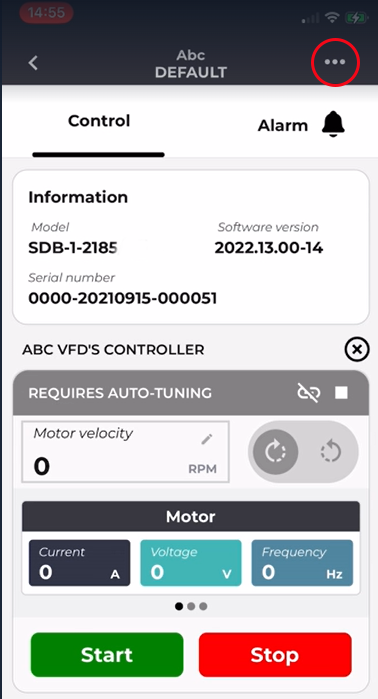
Then select "Configuration", and "Motor Auto-Tuning"
When the auto-tuning wizard screen is displayed, tap on the "start".
The auto-tuning starts, and the procedure step is shown by its radio button.
After 5 seconds, the auto-tuning is complete, and the following step, "review the parameters" is accessible.
In case of an error, the application shows an error modal when pressing the icon !
When the user leaves the error modal, the application goes to the done state, and the user can start a new auto-tuning sequence by tapping the "retry" button.
When done with success, the user can save and apply the motor values by tapping on the button "Apply"