Home » Functions and parameters » Inputs and outputs » I/O's preset configuration » 3-wires preset- Operation
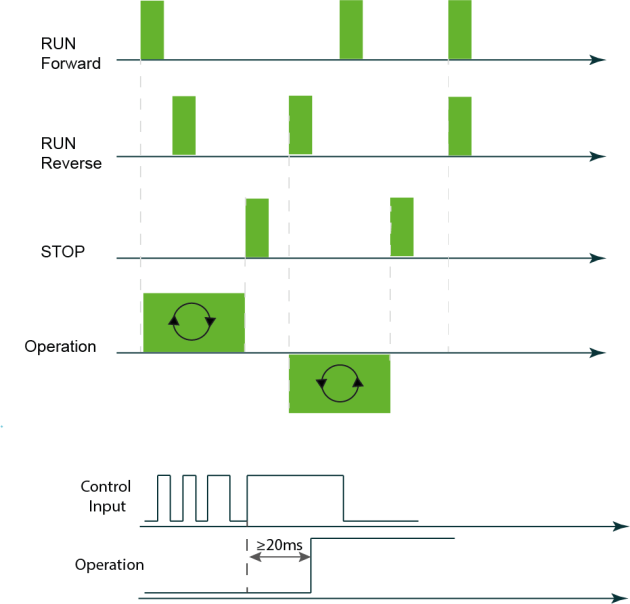
In 3-wires mode, the basic controls are:
- Run forward (default: Di3 input)
- Run reverse (default: Di4 input)
- Stop (default: Di5 input)
Pressing the run forward or the run reverse button momentarily “latches” the drive into a running state internally.
When the digital I/O control source is active, pressing the Stop button breaks that latch, causing the drive to stop the motor
The control inputs are managed as pulses of a minimum duration of 20ms.
Simultaneous activation of run forward and run reverse is managed depending user setting for the priority of spinning direction.
The 3-wire mode can be configured to operate only in the forward direction.
When the single direction is enabled, the preset I/O "Run Reverse" (digital input number 4) is available to be associated with another function such as selecting a preset speed

WIRED STOP MAY BE INACTIVE
The 3-wire Stop input is associated with the digital I/O control source. It is not an independent or overriding Stop function.
If the active control source is Local, pressing the physical Stop pushbutton connected to DI5 does not stop the motor.
If another Remote control source is active instead of the digital I/O source, such as a network control source, the DI5 Stop command is likewise not used to control the motor.
Before operating the equipment, verify which control source is active and which Stop command is available.
Changing between Local and Remote control
Special attention is required when the control source is changed while the motor is running.
If the VFD is running in Remote digital I/O control and the control source is changed to Local:
the motor does not automatically stop;
control authority moves to the Local control source;
the 3-wire Start, Stop, and Direction inputs no longer control the motor;
pressing the wired Stop pushbutton connected to DI5 does not stop the motor;
use a valid Stop command from the Local control source to stop the motor.
If the control source is changed from Local to Remote digital I/O control while using 3-wire control, the VFD does not use an already-existing input state as a new command.
A new valid 3-wire input transition is required.
For example, if the Stop input is already active when Remote digital I/O control becomes active, that existing state does not constitute a new Stop command. A new valid Stop action must occur.
RECOMMENDATION
Avoid changing the active control source while the motor is running.
When a control-source change is required, stop the motor using the currently active control source before changing sources. After the change, verify the active Start and Stop controls before restarting the motor.