Home » Functions and parameters » Motor Control Mode » General » Spinning direction » Spinning Direction Priority
Overview
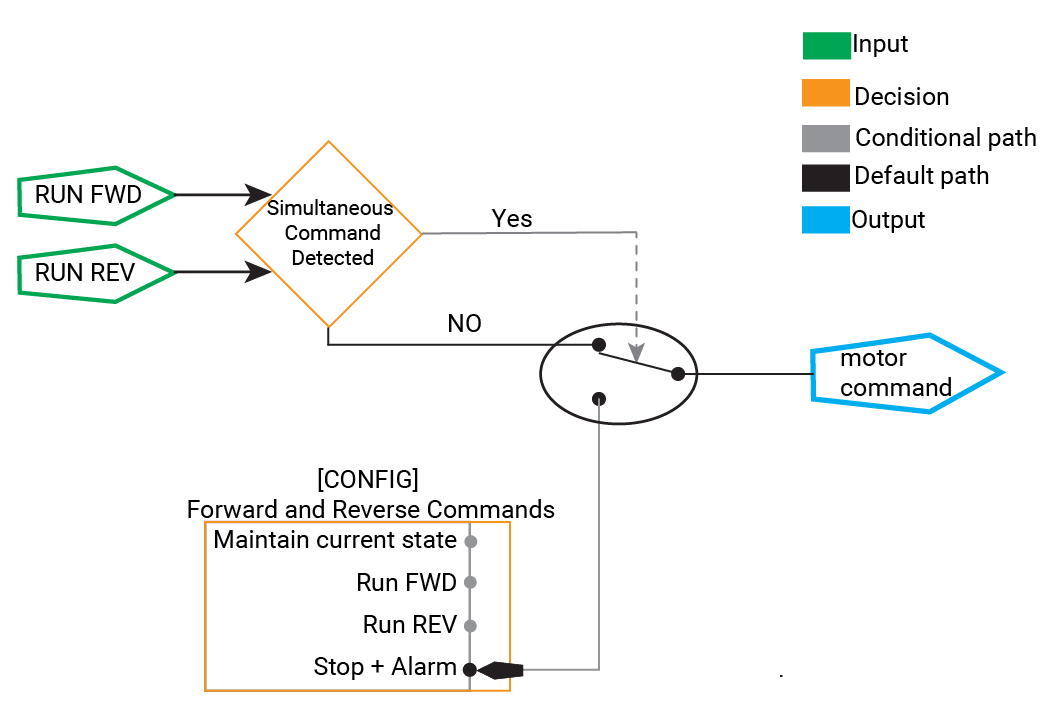
In forward and reverse motor operations applications, the RUN FORWARD and RUN REVERSE commands can be activated simultaneously.
The Spinning Direction Priority feature allows you to define how the Variable Frequency Drive responds in such scenarios.
This section explains the Spinning Direction Priority options and guides you through configuring the VFD to suit your application's needs.
Purpose
Prevent unintended motor behavior when conflicting directional commands are received.
Provide flexibility by allowing you to assign priority to either the forward or reverse command.
Enhance safety and control by defining clear motor responses in simultaneous command situations.
Spinning Direction Priority Options
The VFD offers four configurable options when both RUN FORWARD and RUN REVERSE commands are received at the same time:
1. Stop the Motor and Raise a Medium Alarm (Default)
Behavior:
The motor will stop according to the configured stop mode (e.g., ramp stop, coast stop).
Alarm:
A medium-level alarm is raised to indicate the simultaneous activation of conflicting commands.
Use Case:
This is best for applications requiring the motor to cease operation immediately upon detecting conflicting commands for safety or process reasons.
2. Maintain Current State
- Behavior:
- If the motor is stopped or freewheeling, it will not start.
If the motor runs, it will continue operating in its current direction without change.
An event is recorded in the audit log of the occurrence of simultaneous commands.
Use Case:
Ideal for applications where unintended starts or changes in direction must be avoided unless explicitly commanded.
3. Priority to RUN FORWARD
Behavior:
The motor will start or continue running forward, overriding any reverse command.
If the motor is running in reverse, it will change direction to forward.
Direction Change:
It applies a seamless direction change if it has been enabled and configured.Use Case:
It is suitable when the forward operation is critical and should take precedence over reverse commands.
4. Priority to RUN REVERSE
Behavior:
The motor will start or continue running in reverse, overriding any forward command.
If the motor is running forward, it will change direction to reverse.
Direction Change:
It applies a seamless direction change if it has been enabled and configured.Use Case:
Ideal when the reverse operation is more critical and should override forward commands.
Configuring Spinning Direction Priority
In the advanced motor control settings, find the parameter labeled "Spinning direction priority"
Select the desired option based on your application requirements:
Stop the Motor and Raise a Medium Alarm (Default)
Maintain Current State
Priority to RUN FORWARD
Priority to RUN REVERSE
To ensure smooth direction changes without stopping the motor when the spinning priority is set to Forward or Reverse, follow these steps:
- Go to Advanced Motor Control Settings.
- Enable Seamless Direction Change.

- Review Application Requirements: Before changing the spinning direction priority settings, assess the operational needs and safety implications.
- Test Configurations: After configuring, perform controlled tests to ensure the motor behaves as expected.
- Consult Documentation: For detailed information on alarms, stop modes, and the seamless direction change feature, refer to other sections of the user guide.