Home » Smart HMI » Configuration export
- Export and share from your mobile App into a JSON file
- Export from the HMI into a JSON file to a USB drive
- Import from a USB drive
Export and share from your mobile App into a JSON file
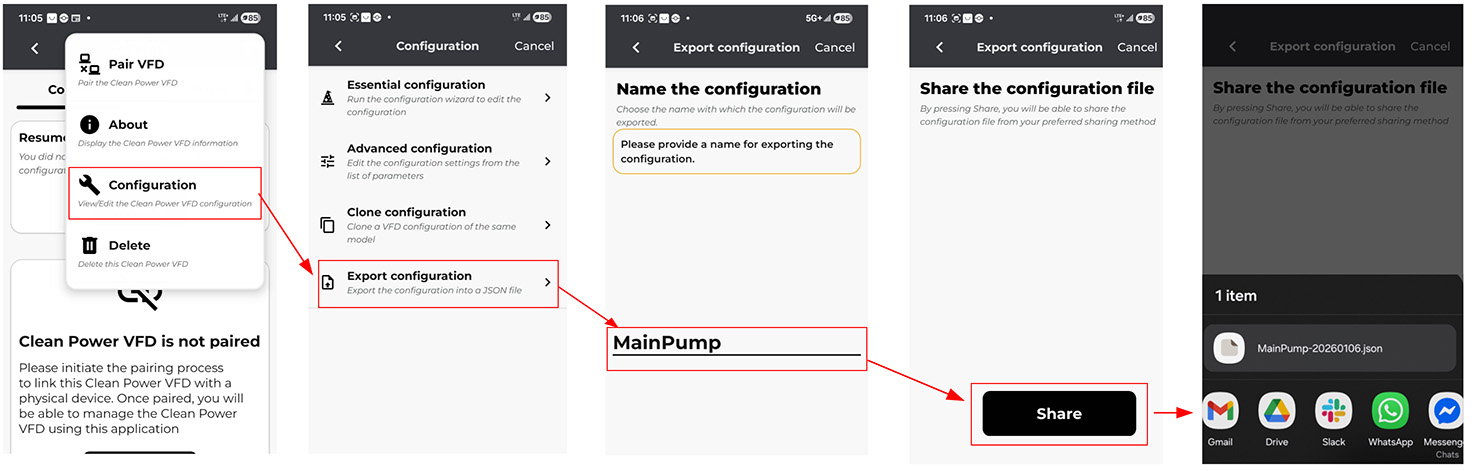
VFD configurations can be exported and shared as JSON files using the mobile app.
- Navigate to Menu >> Configuration >> Export Configuration.
Enter a name for the configuration file and tap Next.
Tap Share.
Select your preferred sharing method from your phone's native menu. You may:
Save the file to a cloud drive.
Save locally to your device (iOS only).
Send via email or an installed messaging app.
Export from the HMI into a JSON file to a USB drive
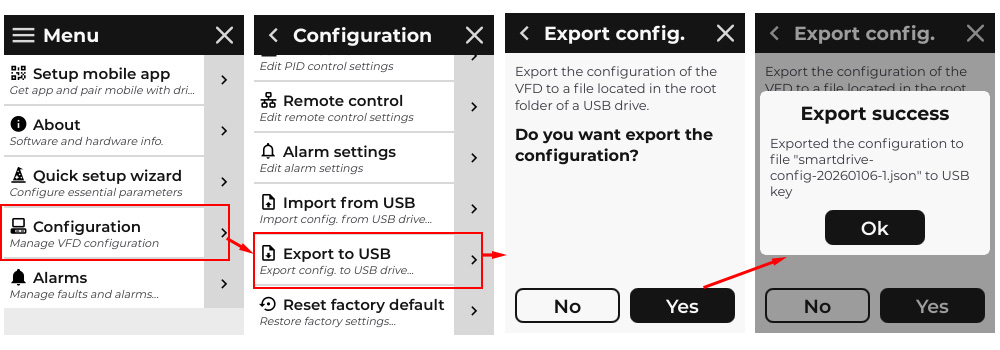
VFD configuration can be exported as JSON file into a USB drive plugged onto the VFD.
Navigate to Menu >> Configuration>>Export to USB
Ensure that a USB drive is plugged onto the USB socket of the VFD, then click Yes
Import from a USB drive
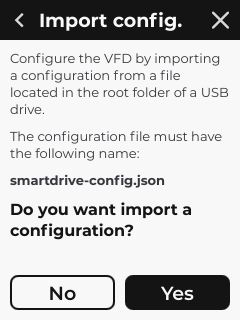
You can import a previously exported VFD configuration file (.JSON) using the VFD’s USB interface.
Note: This action is restricted to hardware compatibility. The configuration file can only be imported onto a VFD with the exact same part number as the source device.
Navigate to Menu >> Configuration>>Import from USB
Click Yes once the USB drive containing the file is plugged onto the USB socket of the VFD.